Production 3-Node HashiCorp Vault Cluster on AWS Ubuntu
Deploy a highly available Vault cluster with integrated Raft storage, AWS KMS auto-unseal, Let's Encrypt TLS, and automatic leader election — built for production workloads.
Why a 3-Node Cluster?
A single Vault server is a single point of failure. A 3-node Raft cluster provides high availability — if one node goes down, the remaining two maintain quorum and continue serving requests. Raft handles leader election automatically.
Fault Tolerance
Survives 1 node failure. Quorum = 2 of 3 nodes.
Auto Failover
Raft elects a new leader in seconds. No manual intervention.
No External Deps
Integrated Raft — no Consul cluster to manage separately.
Cluster Architecture
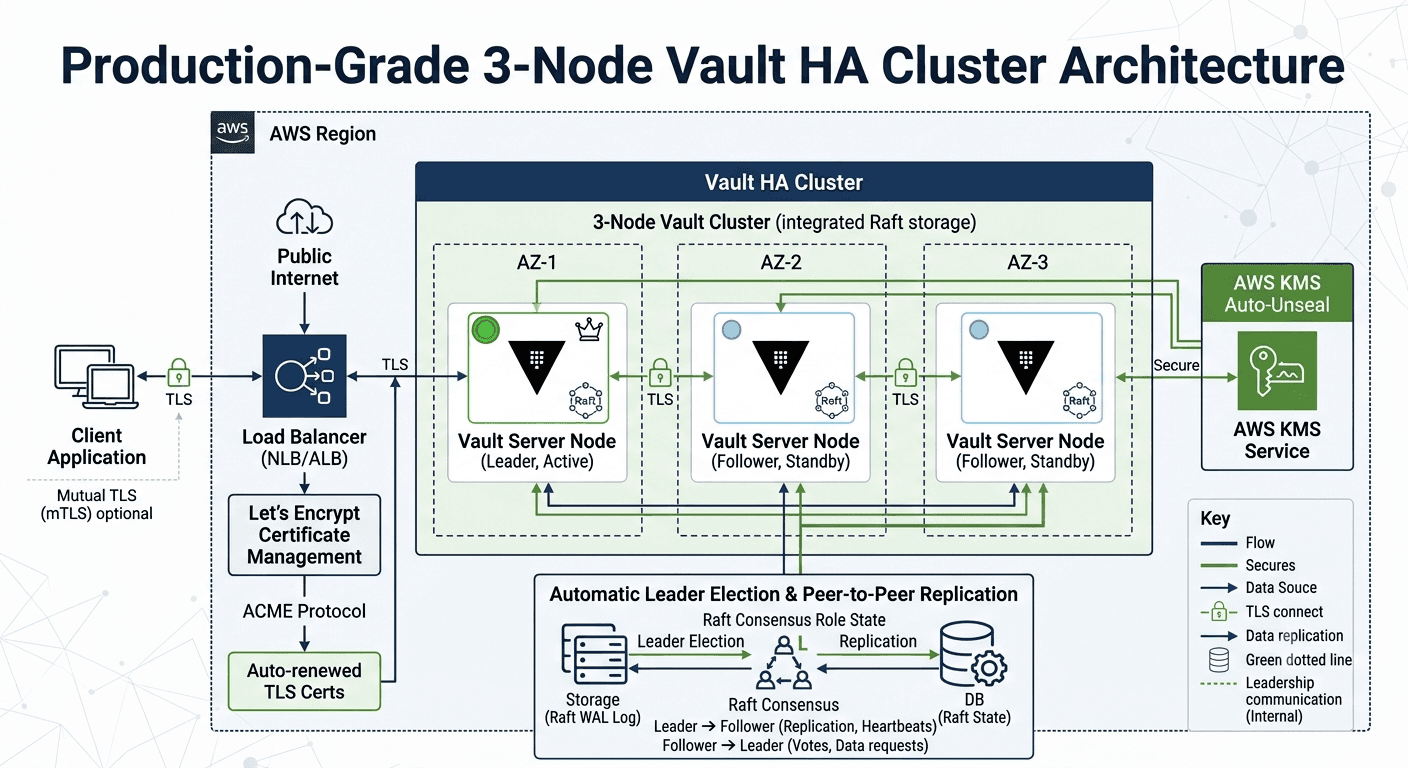
Prerequisites
- ▹3 Ubuntu 22.04/24.04 EC2 instances (t3.medium minimum)
- ▹Spread across 3 Availability Zones
- ▹Private subnets with internal connectivity on ports 8200, 8201
- ▹AWS KMS key for auto-unseal
- ▹IAM role with KMS permissions attached to all 3 instances
- ▹Internal NLB (Network Load Balancer) or Route53 for Vault API
- ▹TLS certificates (Let's Encrypt or ACM Private CA)
- ▹Security group allowing 8200 (API) and 8201 (cluster) between nodes
Step 1: Install Vault on All 3 Nodes
Run these commands on each of the 3 EC2 instances.
sudo apt-get update
sudo apt-get install -y gpg wget lsb-release

wget -O- https://apt.releases.hashicorp.com/gpg | \
  sudo gpg --dearmor -o /usr/share/keyrings/hashicorp-archive-keyring.gpg

echo "deb [signed-by=/usr/share/keyrings/hashicorp-archive-keyring.gpg] \
  https://apt.releases.hashicorp.com $(lsb_release -cs) main" | \
  sudo tee /etc/apt/sources.list.d/hashicorp.list

sudo apt-get update
sudo apt-get install -y vault

vault --version
Step 2: TLS Certificates
Each node needs a TLS cert. For internal clusters, use ACM Private CA or self-signed certs. For public-facing, use Let's Encrypt.
# On each node — create TLS directory
sudo mkdir -p /opt/vault/tls
sudo chown vault:vault /opt/vault/tls
# Option A: Let's Encrypt (if nodes have public DNS)
sudo apt-get install -y certbot

sudo certbot certonly --standalone \
  -d vault-1.yourdomain.com \
  --non-interactive --agree-tos -m admin@yourdomain.com

sudo cp /etc/letsencrypt/live/vault-1.yourdomain.com/fullchain.pem /opt/vault/tls/cert.pem
sudo cp /etc/letsencrypt/live/vault-1.yourdomain.com/privkey.pem /opt/vault/tls/key.pem
sudo chown vault:vault /opt/vault/tls/*.pem
sudo chmod 600 /opt/vault/tls/key.pem
# Option B: Self-signed (internal-only cluster)
# Generate CA (do this once, then copy to all nodes)
openssl genrsa -out /opt/vault/tls/ca-key.pem 4096
openssl req -x509 -new -nodes -key /opt/vault/tls/ca-key.pem \
  -sha256 -days 3650 -out /opt/vault/tls/ca.pem \
  -subj "/CN=Vault CA"

# Generate node cert (run on each node with correct IP/DNS)
openssl genrsa -out /opt/vault/tls/key.pem 4096
openssl req -new -key /opt/vault/tls/key.pem \
  -out /opt/vault/tls/vault.csr \
  -subj "/CN=vault-1.yourdomain.com"

# Sign with CA
openssl x509 -req -in /opt/vault/tls/vault.csr \
  -CA /opt/vault/tls/ca.pem -CAkey /opt/vault/tls/ca-key.pem \
  -CAcreateserial -out /opt/vault/tls/cert.pem -days 365 -sha256 \
  -extfile <(printf "subjectAltName=IP:10.0.1.10,DNS:vault-1.yourdomain.com")

sudo chown vault:vault /opt/vault/tls/*.pem
sudo chmod 600 /opt/vault/tls/key.pem
Step 3: Configure Vault — Node 1 (Leader)
# /etc/vault.d/vault.hcl on vault-1 (10.0.1.10)
storage "raft" {
  path    = "/opt/vault/data"
  node_id = "vault-1"

  retry_join {
    leader_api_addr         = "https://10.0.2.10:8200"
    leader_ca_cert_file     = "/opt/vault/tls/ca.pem"
    leader_client_cert_file = "/opt/vault/tls/cert.pem"
    leader_client_key_file  = "/opt/vault/tls/key.pem"
  }

  retry_join {
    leader_api_addr         = "https://10.0.3.10:8200"
    leader_ca_cert_file     = "/opt/vault/tls/ca.pem"
    leader_client_cert_file = "/opt/vault/tls/cert.pem"
    leader_client_key_file  = "/opt/vault/tls/key.pem"
  }
}

listener "tcp" {
  address         = "0.0.0.0:8200"
  cluster_address = "0.0.0.0:8201"
  tls_cert_file   = "/opt/vault/tls/cert.pem"
  tls_key_file    = "/opt/vault/tls/key.pem"
  tls_client_ca_file = "/opt/vault/tls/ca.pem"
  tls_min_version = "tls12"
}

seal "awskms" {
  region     = "us-east-1"
  kms_key_id = "arn:aws:kms:us-east-1:123456789012:key/your-key-id"
}

api_addr     = "https://10.0.1.10:8200"
cluster_addr = "https://10.0.1.10:8201"
ui           = true
disable_mlock = true
Step 4: Configure Vault — Node 2
# /etc/vault.d/vault.hcl on vault-2 (10.0.2.10)
storage "raft" {
  path    = "/opt/vault/data"
  node_id = "vault-2"

  retry_join {
    leader_api_addr         = "https://10.0.1.10:8200"
    leader_ca_cert_file     = "/opt/vault/tls/ca.pem"
    leader_client_cert_file = "/opt/vault/tls/cert.pem"
    leader_client_key_file  = "/opt/vault/tls/key.pem"
  }

  retry_join {
    leader_api_addr         = "https://10.0.3.10:8200"
    leader_ca_cert_file     = "/opt/vault/tls/ca.pem"
    leader_client_cert_file = "/opt/vault/tls/cert.pem"
    leader_client_key_file  = "/opt/vault/tls/key.pem"
  }
}

listener "tcp" {
  address         = "0.0.0.0:8200"
  cluster_address = "0.0.0.0:8201"
  tls_cert_file   = "/opt/vault/tls/cert.pem"
  tls_key_file    = "/opt/vault/tls/key.pem"
  tls_client_ca_file = "/opt/vault/tls/ca.pem"
  tls_min_version = "tls12"
}

seal "awskms" {
  region     = "us-east-1"
  kms_key_id = "arn:aws:kms:us-east-1:123456789012:key/your-key-id"
}

api_addr     = "https://10.0.2.10:8200"
cluster_addr = "https://10.0.2.10:8201"
ui           = true
disable_mlock = true
Step 5: Configure Vault — Node 3
# /etc/vault.d/vault.hcl on vault-3 (10.0.3.10)
storage "raft" {
  path    = "/opt/vault/data"
  node_id = "vault-3"

  retry_join {
    leader_api_addr         = "https://10.0.1.10:8200"
    leader_ca_cert_file     = "/opt/vault/tls/ca.pem"
    leader_client_cert_file = "/opt/vault/tls/cert.pem"
    leader_client_key_file  = "/opt/vault/tls/key.pem"
  }

  retry_join {
    leader_api_addr         = "https://10.0.2.10:8200"
    leader_ca_cert_file     = "/opt/vault/tls/ca.pem"
    leader_client_cert_file = "/opt/vault/tls/cert.pem"
    leader_client_key_file  = "/opt/vault/tls/key.pem"
  }
}

listener "tcp" {
  address         = "0.0.0.0:8200"
  cluster_address = "0.0.0.0:8201"
  tls_cert_file   = "/opt/vault/tls/cert.pem"
  tls_key_file    = "/opt/vault/tls/key.pem"
  tls_client_ca_file = "/opt/vault/tls/ca.pem"
  tls_min_version = "tls12"
}

seal "awskms" {
  region     = "us-east-1"
  kms_key_id = "arn:aws:kms:us-east-1:123456789012:key/your-key-id"
}

api_addr     = "https://10.0.3.10:8200"
cluster_addr = "https://10.0.3.10:8201"
ui           = true
disable_mlock = true
Step 6: Start Vault on All Nodes
# Run on ALL 3 nodes
sudo mkdir -p /opt/vault/data
sudo chown -R vault:vault /opt/vault

sudo systemctl enable vault
sudo systemctl start vault
sudo systemctl status vault
Step 7: Initialize the Cluster (Node 1 Only)
Initialize on one node only. The other nodes auto-join via retry_join.
# On vault-1 only
export VAULT_ADDR="https://10.0.1.10:8200"
export VAULT_CACERT="/opt/vault/tls/ca.pem"

vault operator init -recovery-shares=5 -recovery-threshold=3
# Expected output
Recovery Key 1: xxxxx...
Recovery Key 2: xxxxx...
Recovery Key 3: xxxxx...
Recovery Key 4: xxxxx...
Recovery Key 5: xxxxx...

Initial Root Token: hvs.xxxxxxxxxxxx

Vault initialized with 5 key shares and a key threshold of 3.
# Login
vault login hvs.xxxxxxxxxxxx
⚠ Important: Save recovery keys in a secure location (e.g., AWS Secrets Manager, split across team). Revoke the root token after initial setup.
Step 8: Verify Cluster Status
# Check Vault status on any node
vault status
# List Raft peers (shows all 3 nodes)
vault operator raft list-peers
# Expected output
Node       Address            State       Voter
----       -------            -----       -----
vault-1    10.0.1.10:8201     leader      true
vault-2    10.0.2.10:8201     follower    true
vault-3    10.0.3.10:8201     follower    true
Step 9: Network Load Balancer
Put an internal NLB in front of the cluster so clients connect to a single endpoint. The NLB health check routes traffic only to the active leader.
# AWS CLI — Create target group with health check
aws elbv2 create-target-group \
  --name vault-tg \
  --protocol TCP \
  --port 8200 \
  --vpc-id vpc-xxxxxxxx \
  --target-type instance \
  --health-check-protocol HTTPS \
  --health-check-path "/v1/sys/health?standbyok=true" \
  --health-check-port 8200
# Register all 3 nodes
aws elbv2 register-targets \
  --target-group-arn arn:aws:elasticloadbalancing:...:targetgroup/vault-tg/xxx \
  --targets Id=i-node1 Id=i-node2 Id=i-node3
Health check: /v1/sys/health?standbyok=true returns 200 for both active and standby nodes, so the NLB distributes across all healthy nodes. Vault automatically forwards writes to the leader.
Step 10: Security Group Rules
# Vault Security Group Rules

# Inbound
Port 8200  TCP  from: app-sg, nlb-sg     # Vault API
Port 8201  TCP  from: vault-sg (self)     # Raft cluster communication
Port 80    TCP  from: 0.0.0.0/0          # Let's Encrypt ACME (temp)

# Outbound
Port 8200  TCP  to: vault-sg (self)       # Cluster API
Port 8201  TCP  to: vault-sg (self)       # Raft replication
Port 443   TCP  to: 0.0.0.0/0           # KMS API, OCSP, etc.
Step 11: Enable Audit Logging
vault audit enable file file_path=/var/log/vault/audit.log

# Verify
vault audit list
Step 12: Automated Raft Snapshots
Schedule daily Raft snapshots to S3 for disaster recovery.
# /opt/vault/scripts/backup.sh
#!/bin/bash
TIMESTAMP=$(date +%Y%m%d-%H%M%S)
SNAPSHOT_FILE="/tmp/vault-snapshot-${TIMESTAMP}.snap"
S3_BUCKET="s3://my-vault-backups/snapshots"

export VAULT_ADDR="https://127.0.0.1:8200"
export VAULT_CACERT="/opt/vault/tls/ca.pem"
export VAULT_TOKEN=$(cat /opt/vault/.backup-token)

vault operator raft snapshot save "$SNAPSHOT_FILE"

aws s3 cp "$SNAPSHOT_FILE" "$S3_BUCKET/${TIMESTAMP}.snap" --sse AES256

rm -f "$SNAPSHOT_FILE"
echo "Snapshot saved: $TIMESTAMP"
# Cron job (run on leader node)
sudo chmod +x /opt/vault/scripts/backup.sh

# Daily at 2 AM
echo "0 2 * * * vault /opt/vault/scripts/backup.sh" | sudo tee /etc/cron.d/vault-backup
Step 13: Test Failover
Simulate a node failure to verify HA works correctly.
# Check current leader
vault operator raft list-peers
# Stop the leader node
# On the leader node (e.g., vault-1):
sudo systemctl stop vault
# Verify new leader elected (from another node)
export VAULT_ADDR="https://10.0.2.10:8200"
vault operator raft list-peers

# Expected: vault-2 or vault-3 is now "leader"
# Vault API continues to work via NLB
# Bring the node back
# On vault-1:
sudo systemctl start vault

# It auto-unseals via KMS and re-joins as follower
vault operator raft list-peers
Step 14: Monitoring with Prometheus
Add telemetry to vault.hcl on each node for Prometheus scraping.
# Add to /etc/vault.d/vault.hcl on all nodes
telemetry {
  prometheus_retention_time = "24h"
  disable_hostname         = true
}
# Prometheus scrape config
- job_name: 'vault'
  metrics_path: '/v1/sys/metrics'
  params:
    format: ['prometheus']
  scheme: https
  tls_config:
    ca_file: /etc/prometheus/vault-ca.pem
  bearer_token_file: /etc/prometheus/vault-token
  static_configs:
    - targets:
        - '10.0.1.10:8200'
        - '10.0.2.10:8200'
        - '10.0.3.10:8200'
Cluster Operations Cheat Sheet
# Remove a dead node from the cluster
vault operator raft remove-peer vault-3
# Add a replacement node (new node joins via retry_join)
# Just start Vault on the new node with retry_join config
# It auto-joins and syncs data from the leader
# Step down the leader (graceful)
vault operator step-down
# Restore from snapshot
vault operator raft snapshot restore /path/to/snapshot.snap
Production Checklist
3 AZs
One node per Availability Zone. Survives AZ outage.
KMS Auto-Unseal
No manual unseal on restart or AMI replacement.
TLS Everywhere
API and cluster traffic encrypted. Mutual TLS between nodes.
Internal NLB
Single endpoint for clients. Health checks route to healthy nodes.
Daily Snapshots
Raft snapshots to S3 with encryption. Test restores monthly.
Audit Logging
File audit device → ship to CloudWatch or S3 for compliance.
Prometheus + Grafana
Monitor seal status, leader changes, request latency.
Root Token Revoked
Only admin policies in use. Generate root via recovery keys if needed.
Troubleshooting
Nodes not joining cluster
Check port 8201 is open between nodes in the security group. Verify TLS CA cert is the same on all nodes.
Split brain / no quorum
Happens when 2+ nodes are unreachable. Vault becomes read-only. Restore network connectivity or use raft remove-peer to remove dead nodes.
KMS error on unseal
Verify IAM role has kms:Encrypt, kms:Decrypt, kms:DescribeKey. Check instance metadata service is reachable (IMDSv2).
TLS handshake failure between nodes
Ensure the SAN (Subject Alternative Name) in each cert includes the node's IP and hostname. Verify ca.pem is the same file on all 3 nodes.
Summary
You now have a production-grade, highly available Vault cluster across 3 AZs. Raft handles consensus and leader election, KMS handles auto-unseal, and TLS encrypts all traffic. If a node dies, the cluster continues serving — and the dead node auto-recovers when restarted.
3
Nodes
3
AZs
Auto
Failover
0
Downtime
Comments
No comments yet. Be the first to comment!